

New Features

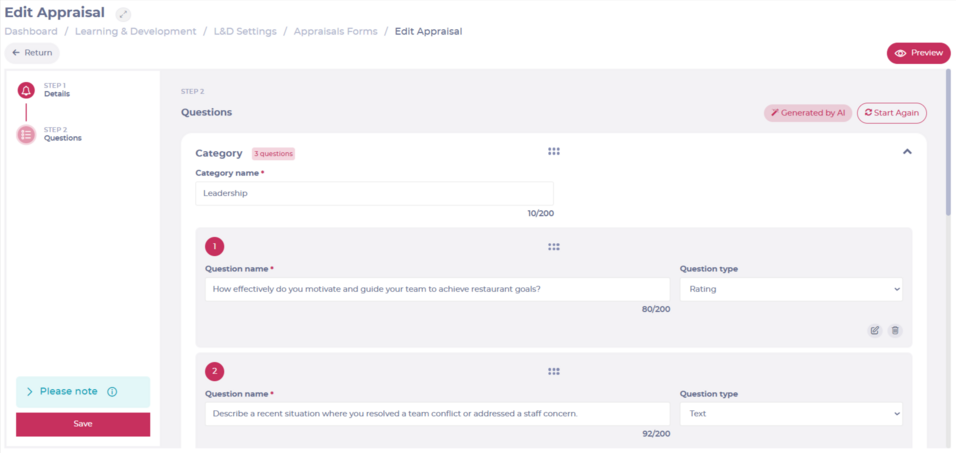
AI Appraisal Creation
AI-powered Appraisal creation can now be enabled for customers with AI and Appraisals enabled.
When creating a new Appraisal, users can choose to build content manually or generate it using AI. After completing the initial setup (such as appraisal name and sign-off settings), AI can generate a structured appraisal from a prompt.
The AI will create:
- Appraisal sections
- Questions within each section
- Appropriate question types
- Suggested answer options for select and multi-select questions
Generated content can be fully edited, and users can regenerate the appraisal if they wish to start again.
Why this Matters
Creating structured appraisals can be time-consuming. AI Appraisal Creation accelerates the process by generating a complete draft based on a simple prompt, while still giving users full control to refine and customise the final content.
Key Benefits
- Faster setup: Generate a structured appraisal in seconds from a short prompt.
- Complete draft content: Sections, questions and answer options are created automatically.
- Full control retained: Edit, refine or regenerate content at any time.

Improvements
Noticeboard – Subcategory order alignment with Mapal One
The configured order of Noticeboard subcategories set in Flow MS is now sent to Mapal One. Subcategories will display in Mapal One in the same order as defined in Flow.
Why this Matters
Flow MS is the configuration source for Noticeboard categories and subcategories. Previously, the configured subcategory order was not passed to Mapal One, meaning the display order in Mapal One did not match the order defined in Flow.
Key Benefits
- Aligned configuration and display: Subcategories now appear in Mapal One in the same order as configured in Flow.
- Single source of truth: The structure defined in Flow MS is consistently reflected in Mapal One.
- Improved platform consistency: Noticeboard organisation is now aligned across both systems.
Goals – Edit due date on assigned Goals
Flow MS users can now update the due date of an assigned Goal directly from the learner profile. The Due Date field is now editable, allowing users to select a new date and save the change.
Why this Matters
Goal deadlines may need to be adjusted due to operational changes, learner availability, or revised expectations. Previously, assigned Goal due dates could not be amended once set. This enhancement allows due dates to be amended without additional administration.
Key Benefits
- Flexible deadline management: Due dates on assigned Goals can be updated when required.
- Improved administrative control: Managers and administrators can amend deadlines directly within the learner profile.
- Streamlined workflow: Changes can be made quickly using a built-in date picker.
Noticeboard – Library visibility for items assigned via Collections
Noticeboard items that are included within a Collection will now appear in the Mapal One Library once the learner has read them. The item will continue to appear within its Collection and will also become accessible as a standalone Noticeboard item in the Library.
If the same Noticeboard item is included in multiple assigned Collections, it will appear in the Library once it has been read in any one of them.
Why this Matters
Noticeboard content can be assigned directly or as part of a Collection. This update ensures that, once read, Noticeboard items are accessible in a consistent way within the Mapal One Library, regardless of how they were assigned.
Key Benefits
- Improved content accessibility: Read Noticeboard items are available in the Library even when assigned via Collections.
- Consistent learner experience: Noticeboard content behaves the same way once read, whether assigned directly or through a Collection.
- Reduced duplication impact: Items included in multiple Collections only need to be read once to appear in the Library.

Bug fixes
- Some job titles not visible when selecting all branches for Noticeboard audience
- Affected job titles now appear correctly when all branches are selected.
- Print Sitting report formatting issues causing overlapping content
- Print Sitting reports now display correctly without overlapping text, ensuring all information is clearly visible.
- ‘Show in recommended’ toggle not updating correctly on Noticeboard items
- The toggle now saves and updates correctly when enabled or disabled on Noticeboard items.

Mapal Studio
🎨 Updated Agent Interface
The Mapal Studio Agent interface has received a visual refresh, introducing a more modern look alongside a few additional improvements.
Why this Matters
A refreshed interface helps keep the authoring experience intuitive and up to date, while still giving creators the flexibility to continue using the layout they are most comfortable with.
Key Benefits
- 🖥️ Updated visual design for a cleaner creation experience
- ⚙️ Additional improvements within the Agent environment
- 🧭 Flexible workflow for both new and experienced Mapal Studio creators
🌐 CSV Upload for Translation Glossaries
Large organisations managing multiple languages can now upload translation glossaries via CSV file.
Why this Matters
Bulk glossary uploads simplify translation management and reduce manual entry time for multi-site or international hospitality businesses.
Key Benefits
- 📂 Upload large glossaries in one step
- 🌍 Streamlined multi-language management
- ⏱️ Saves time for large-scale translation projects
🎭 Feature Highlight: Experiences (Scenarios)
The Experiences feature supports the creation of more interactive, scenario-based learning. Accessible via the Scenarios button, users can build learning journeys using different nodes to design customised pathways.
Why this Matters
Scenario-based learning is particularly valuable in hospitality, where real-world decision-making and service situations are key to performance.
Key Benefits
- 🎬 Create interactive, branching scenarios
- 🧠 Support applied, decision-based learning
- 🛠️ Greater flexibility in lesson design
🤖 Smarter Agent with Enhanced UI
The Mapal Studio Agent has been upgraded for improved accuracy, articulation, and handling of more complex requests. A refreshed interface is also being rolled out, providing a cleaner and more intuitive experience.
Why this Matters
For operational managers and L&D teams creating content quickly, improved AI support helps streamline lesson development and refinement.
Key Benefits
- 🧠 Improved response quality and depth
- ✨ More intuitive, refreshed interface
- ⚡ Greater efficiency for complex content tasks
🔁 Feature Reminder: Route Buttons to Any Page
Buttons within lessons can route learners to any page, provided the lesson navigation setting is set to “Open.”
Why this Matters
Flexible navigation supports varied learning journeys — useful for refresher training, assessments, or role-specific pathways.
Key Benefits
- 🔀 Custom learner navigation
- 🧭 Support non-linear lesson structures
- 🎯 Greater control over learning flow
📂 Nested Folders (One Level Deeper)
Folders can now be nested one level deeper, supporting improved workspace organisation.
Why this Matters
As your Mapal Studio library grows, structured organisation becomes critical for efficiency and clarity.
Key Benefits
- 🗂️ Organise by site, department, or initiative
- 📁 Cleaner workspace structure
- 📈 Scales more effectively with growth
🛡️ SOC 2 Type II Certification Achieved
Mapal Studio has achieved SOC 2 Type II certification. Security reports are available for organisations that require documentation.
Why this Matters
Security and data protection are key considerations for hospitality operators managing employee learning data across multiple locations.
Key Benefits
- 🔐 Independent verification of security controls
- 📑 Documentation available for IT and compliance teams
- 🏢 Added confidence for enterprise customers